Tag: iPhone 3GS

  • How to Get Cydia on iOS 6b1 After Tethered Jailbreak 0n A4 Devices

    How to Get Cydia on iOS 6b1 After Tethered Jailbreak 0n A4 Devices

    We got some hot news in the town for the developers who are on iOS 6b1 and wanted to have Cydia on their iPhone/iPod. But, due to the broken status of Cydia on iOS 6b1, they couldn’t have Cydia after the official Tethered Jailbreak for iOS 6b1 announced few days back by The iPhone Dev-Team. The Jailbreak is only for Developers who want to update their Apps on iOS 6. The Jailbreak doesn’t add Cydia on your Device, though it adds SSH Support on your iDevice by which you can access the Root and do your works. It also adds afc2d support that allows your iPhone/iPod to connect to root by software’s like iFunbox or Cyberduck for MAC.
    cydia-ios-6-b1-download

    Still there is no way by which a normal person can access to iOS 6beta 1 without a Dev Account. You can register your UDID and then can access iOS 6beta 1. We would recommend staying away from iOS 6 betas because they are way to buggy and not stable. On the other hand, we got a method for developers who are on iOS 6 beta 1 to install Cydia on their iPhone/iPod. Do remember that Cydia is not stable on iOS 6 beta 1 and you might face problems after installing it. Rest is up to you.

    If you are ready for Cydia fund on your iPhone/iPod, simply first Jailbreak your iPhone/iPod with this guide and then follow the steps below.

    Step 1:

    Connect to SSH

    Step 2:

    Copy and run the following command (the whole thing, you may need to scroll):  wget -q -O /tmp/cyinstall.sh http://wyndrepo.googlecode.com/files/cyinstall.sh && chmod 755 /tmp/cyinstall.sh && /tmp/cyinstall.sh

    Step 3:

    If you do not see cydia, power off and reboot tethered.

    Note: I think uicache is broken which means some icons will disappear; just respring after installing something. (Method Courtesy @Andrew Liu)

    @Tam Nguyen and @Hamza_tariq showing the proof of Cydia running on their iPhone and iPod tested this method. Do remember that this method requires some SSH Skills. If you don’t know about it, then don’t do it.

    Below is the video proof of Cydia on iOS 6b1 by @Tam Nguyen.

    Video:

    Do share your experience with us about Cydia on iOS 6b1. Do let us know about how many of you have succeeded installing Cydia on iOS 6b1.
  • How to Fix No Signal Issue After Downgrading iPad Baseband 6.15.00

    How to Fix No Signal Issue After Downgrading iPad Baseband 6.15.00

    Today people owning an iPhone 3GS/3G got the downgraded method that was rumored from long. This downgrade method was confirmed to come somewhere back in 2010. After full two years of this rumor, today we got the iPad baseband downgrade in works. The iPad baseband downgrade is for 6.15.00 to 5.13.02 baseband to retain your official Unlock via Ultrasn0w and get back your GPS working. Every one must be happy in downgrading their Baseband from 6.15.00 to 5.13.02 and they must be facing some issues after the downgrade. Few people, not every one, face the issue of No Signal issue on their iPhone 3GS/3G after the iPad baseband Downgrade.

    Those of you are facing the issue should not worry about this issue because it is normal and you need to do few things in Cydia to resolve this issue. The things that you need to do are not pre-requisite of technical skills, though it only requires some basic knowledge of adding and removing Packages from Cydia.  We assume that every one must know about this thing for sure. If you don’t know about this removing of Cydia Packages, then don’t worry. We got it covered for you.

    Now follow the steps told by @MuscleNerd to fix the issue:

    Step 1:

    Open Cydia and go to Manage> Packages

    Step 2:

    Once you are in that place, see for Mobile Substrate or Ultrasn0w.

    Step 3:

    Now uninstall Ultrasn0w first and then re-install it. The issue must be fixed.

    Step 4:

    If the issue still remains, then un-install Mobile Substrate and re-install it.

    These steps should fix your no signal issue after downgrading the iPad baseband. If you want any help regarding the iPad baseband downgrade, feel free to contact us from our contact us section and an expert will help you with your issue.


  • How To: Redsnow 0.9.14 b1 Downgrade’s iPad Baseband 06.15.00 To 05.13.04

    How To: Redsnow 0.9.14 b1 Downgrade’s iPad Baseband 06.15.00 To 05.13.04

    After a long wait the iPhone Dev-Team has released the tool to downgrade the two years old iPad baseband to the normal iPhone baseband. With out con-fluctuating let’s roll over directly to the steps of downgrading to 05.13.04. It’s released for both Windows and OS X. The new Redsn0w 0.9.14 b1 will allow you to downgrade the iPad baseband and jailbreak.

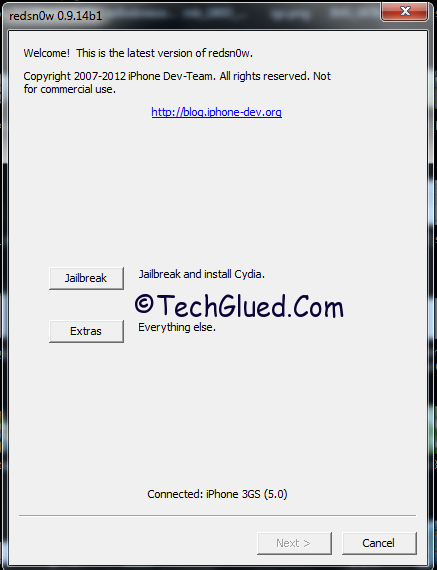
    1. Run Redsn0w 0.9.14 b1 on Windows or OS X
    2. Go to Extras > Select IPSW
    3. Select the IPSW firmware which you have installed on your iPhone 3G/iPhone 3GS right now
    4. Now connect your iPhone 3G/iPhone 3GS to your PC/Mac
    5. Turn it off before connecting (An important step)
    6. Now go back to the home screen of Redsn0w 0.9.14 b1
    7. Click Jailbreak
    8. Check mark ‘Downgrade from iPad baseband’
    9. Enter into DFU mode
    10. Let the exploit work on you device

    After the device turns on, the jailbreak data will be all new with the old iPhone 05.13.04 baseband and can be unlocked from ultrasn0w from Cydia. Below are the release notes for Redsn0w 0.9.14 b1

    For those who are wondering if you can update your 3G or 3GS to 06.15 solely for the purposes of downgrading to 05.13.04, the answer is “yes” for 3G owners, and “maybe” for 3GS owners.  The iPad baseband is not compatible with 3GS units manufactured week 34 of 2011 or later.  If you have an iPhone3GS and if digits 3-5 of its Serial Number are 134 or later (xx134…), then you should NOT try to install the 06.15 baseband on your 3GS!  It will brick your radio, preventing both the downgrade from working and normal iPhone software from using it as a phone!  Be warned!

    Download Redsn0w 0.9.14 b1 for

  • Apple Ninja’s Expert Guide For Buying iPhone/iPad/iPod Before And After

    Apple Ninja’s Expert Guide For Buying iPhone/iPad/iPod Before And After

    In this advanced era of technological revolution, where we get a new model/series of a Phone after a quarter/month/ year, it is quite hard to select a handset of your choice. It goes with Apple in a way that, if you are planning to grab an iPhone from Apple, you just go to the Store/Shop, grab an iPhone, and then walk out of the store happily. When you start to using the iPhone, you find that there is nothing much you can do other than calling, messaging downloading apps/games/music from iTunes, play with voice control (SIRI), and just lock/unlock the iPhone by sleep button on top.

    Then you realize that you have wasted your money. You could have bought some other smart phone at a lower cost than an iPhone. If the person has some skills, he will open up Google.com to see what he can do with his iPhone. After going through all the stuff on Google.com, he will simply close the browser, will have some headache pills and go off to sleep.

    Like I told you before that to buy an iPhone is a piece of cake. But to know about what you should know or need to know after you have bought an iPhone is not easy. This doesn’t means that the iPhone is a complicated Phone. It is Apple that has limited the boundaries of the iPhone and its users.

    Expert Guide For Buying iPhone-iPad-iPod


    Now, being an Apple Geek, Expert, Enthusiastic, Helper, and Blogger; people sometime come and ask me about this iPhone things that we are going to buy an iPhone, can you please guide us a little about this iPhone-like what should we look into it, what iPhone should we buy, what is jailbreak, what is unlock, and things like that. So I thought to come up with detailed information on these things and a normal/new user going to buy an iPhone should keep in his/her mind before making the purchase.

    So what are you waiting for?

    October 7, 2012:

    We have updated the Book with iPhone 5 Details. You can download the updated version of the book from here.

  • iPad Baseband Downgrade Emerging Sunday/Funday (Semi-Confirmed)

    iPad Baseband Downgrade Emerging Sunday/Funday (Semi-Confirmed)

    The end of the week would be done with a great news and release. This doesn’t means that Apple would be releasing any new iOS 6 beta version or OS X Lion or any new iPhone Model, instead people owning an iPhone 3GS and iPhone 3G would be getting something for which they had waited for ages, Something that they expected with every new release of Jailbreak and Unlock. Can you guess about that something? Yes, No, Maybe?  The thing you are guessing right now is 100% right. The iPad Baseband Downgrade for iPhone 3GS and iPhone 3G users. This is the most awaited iPad Baseband Downgrade that an owner of iPhone 3GS and iPhone 3G could ever have waited for.

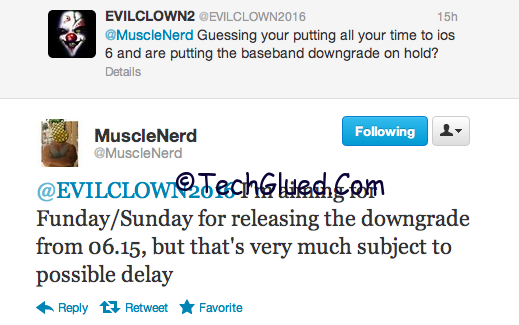
    This is the one and only Downgrade for which the owners of iPhone 3GS and iPhone 3G were waiting from ages and some of them lost hope, so they sold out their iPhone’s. Those of you still got an iPhone 3GS or iPhone 3G, good news is that the iPad baseband Downgrade is coming your way this Sunday a Funday.Remember, we told you about the downgrade for the iPad Baseband Downgrade few days back and told you that this Sunday is going to be a Funday? Now it seems that our prediction is going to be true. The news is Semi-Confirmed by @MuscleNerd in a reply to one of his Followers on asking and @MuscleNerd replied:

    We got some hint on the release of the iPad Baseband Downgrade by @MuscleNerd scheduled for this Sunday. He has also mentioned that the release can be delayed due to any circumstances like errors or anything came in between for the final release. We hope that every goes straight on the track and this Sunday becomes a Funday once again after ages.

    Don’t forget to check back on Sunday for the tutorial of the iPad Baseband Downgrade.

  • iPad Baseband Downgrade For iPhone 3G/3GS Around The Corner

    iPad Baseband Downgrade For iPhone 3G/3GS Around The Corner

    This Sunday is going to be a real Funday for people owning an iPhone 3GS and iPhone 3G stuck on iPad baseband. If you people remember, we told you few years back that the iPad baseband would be downgraded some time and still no eta was announced for it. We also showed you the Tweet from @Sherif_Hashim regarding the iPad baseband Downgrade in progress. At that time, we all were expecting the release of this downgrade method with every new released of the Jailbreak and update of Ultrasn0w. Still we never saw the iPad baseband coming to light. Our hopes were left in the dark with a small “?” mark left behind for iPad baseband downgrade.

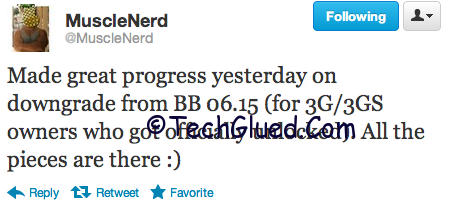
    Finally, today @MuscleNerd, the Dev-Team member Tweeted on his Twitter account that they have made a significant process in downgrading the iPad Baseband on iPhone 3GS and iPhone 3G users.

    ipad-baseband-downgrade

    Made great progress yesterday on downgrade from BB 06.15 (for 3G/3GS owners who got officially unlocked).All the pieces are there :)

    — MuscleNerd (@MuscleNerd) June 10, 2012

    Many of you won’t know why the iPad baseband was released for the iPhone 3GS and iPhone 3G. To make the entire story in short, the iPad baseband was introduced to unlock iPhone 3GS and iPhone 3G on iOS 4.1+ basebands. There was no unlock for new basebands on iPhone 3GS and iPhone 3G onwards from iOS 4.1.  The problem with iPad baseband is that people loose their GPS, face battery drainage issues, and notification don’t works on iPad baseband.

    Finally we have heard a great news for people waiting for the freedom from iPad baseband 6.15.00 on iPhone 3GS and iPhone 3G. The plans for the Dev-Team are to downgrade the iPad baseband 6.15.00 to 5.13.02 baseband, so people can get their official Unlock by Ultrasn0w and get back their Navigation and push notifications.

    Till now there is no eta for the release of this Method. We assume that the iPad baseband downgrade will come some time this week or the next. How many of you are excited after hearing this news?